CintaNotes is a Windows application for fast and convenient note taking. It can clip text from any application on a hot key, has a powerful tagging system and effective full-text search capability.
0
Corrigé

Numbered text formatting error (CN 2.3 Beta 1)

Arseniy (CN Support Team) il y a 12 ans mis à jour par Alex Jenter il y a 12 ans 0

Reproduce:


  1. Make text formatting with Ctrl+Tab
  2. Make this text a numbered list with Ctrl+Tab

Result: numbered text goes to its original position as it was before Ctrl+Tab formatting


editing text-formatting
Solution
Alex Jenter il y a 12 ans

Fixed in CN 2.4

0
À l'étude

Displaying and editing note's title in more than one line

Владимир Беликин il y a 11 ans mis à jour par Alex Jenter il y a 11 ans 3

Showing note's title only in one line makes it difficult to read and write long note's titles. It is necessary to duplicate them in the beginning of the notes. So I have to duplicate long note's title at the beginning of the note's text.

viewing editing
0
Corrigé

In edit boxes, characters like "y" "q" and "_" don't fit

John Grape il y a 14 ans mis à jour par Alex Jenter il y a 14 ans 3
It cuts characters like "y" "q" and 
"_" - invisible in tags and title line
please see sreenshot

error text-formatting
Solution
Alex Jenter il y a 14 ans
Fixed in 1.6.1
0
Corrigé

Importing .db modifies the source file (1.5.4)

burrum il y a 14 ans mis à jour par Alex Jenter il y a 14 ans 0

If I import a .db file into CN 1.5.4, it modifies that file. This is no way right.


Reproduce:

1. Create two portable CN installations: 1.5.3 and 1.5.4
2. Create a .db in CN 1.5.3, close CN
3. Import that .db in CN 1.5.4
4. Run CN 1.5.3

5. Get an error:
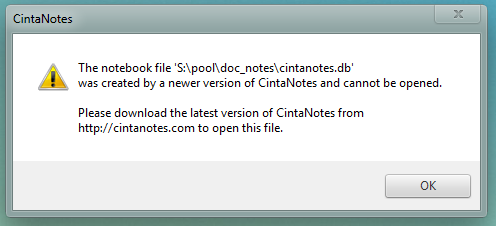

Image 13


This is getting even more interesting in the following scenario:

Run CN 1.5.3
Run CN 1.5.4, import file that is opened in CN 1.5.3.

The file is changed, but the running CN 1.5.3 is still able to write into it. It will not be able to run again, but if we open 1.5.3's .db file in 1.5.4, we will see the new entry.


I think importing should not touch the source in any way.
import files external
Solution
Alex Jenter il y a 14 ans
Fixed in 1.5.5
0
Corrigé

ERROR:class err::InvalidStateException Postcondition failed: app::model::data::NoteRepository::getSectionProperties static_cast<bool>(si)

cigar huang il y a 11 ans mis à jour par Alex Jenter il y a 11 ans 9
scroll vertical bar of main page and always popup the error mesaage with the content in title at the same position.
0
À l'étude

Incorrect clipping of .рф domain site

Arseniy (CN Support Team) il y a 12 ans mis à jour il y a 12 ans 0

Clipping .рф site link from Google Chrome results in its punycode version in CN and the link is not correctly recognized.

Firefox hasn't this problem but the link after clipping in CN is not active. 

taking/clipping globalization links
0
Écarté

Add shortcut to exit main window while keeping the filter

Thomas Lohrum il y a 13 ans mis à jour par Alex Jenter il y a 13 ans 6

Right now it is possible to keep a filter while closing the main window by using the window [X] button. I want to have a shortcut for this.

main-window
Solution
Alex Jenter il y a 13 ans

Already possible - see comments

0
Terminé

[New note] Put focus on title

Gilles il y a 15 ans mis à jour par Alex Jenter il y a 15 ans 0
I'm using 1.4.3, and notice that when creating a new note, the focus is put on the body of the note rather than the title.

I find this annoying, and would rather start typing a title right away instead of having to SHIFT+TAB.
Solution
Alex Jenter il y a 15 ans
Hi and thanks for your message!

Actually what you want is already implemented in 1.4.3.
Try changing the "editor.focus.title" option in the cintanotes.settings file. This option specifies whether the title field of the note editor is focused initially. When this option is 0 (off), the note text field gets focused. Default value: 0 (off). Try setting it to 1.

Note: cintanotes.setting is usually located near the cintanotes.exe, but in case you installed CN into the Program Files folder, it will be in %APPDATA%/CintaNotes.
0
À l'étude

Add "Reset to defaults" button to notes list options dialog

Alex Jenter il y a 12 ans mis à jour il y a 12 ans 1
Currently there's no way to reset to default fonts and such.
notes-list configuring
0
Corrigé

Alt Codes error

Arseniy (CN Support Team) il y a 12 ans mis à jour par Alex Jenter il y a 12 ans 0

Typing an Alt-code (like Alt+0151, Alt+0150 & etc) several times in the note results in correct symbol for the first time, but the next is - ෗

keyboard
Solution
Alex Jenter il y a 12 ans
Fixed in 2.5.1
+6
Écarté

Get a list of files clipped if files selected in windows explorer

Alex Jenter il y a 15 ans mis à jour par Christof Deininger il y a 10 ans 3
When I press the clipping hot key on a set of selected files in explorer, CintaNotes should create a note listing all these file names.
complexity:medium taking/clipping
Solution
Christof Deininger il y a 10 ans
Closed due to inability to collect 10 votes for more than 2 years.
0
Corrigé

new/edit window opens beyond visible space

jww il y a 14 ans mis à jour par Alex Jenter il y a 14 ans 3
Everything was ok in 1.5.*, but now almost any new/editnote window opens far beyond right edge of the visible space (i have two fullhd monitors)
error
Solution
Alex Jenter il y a 14 ans

0
Corrigé

Pasting from MS OneNote into note editor not working

ChrisCN il y a 14 ans mis à jour par Alex Jenter il y a 14 ans 6
In some cases CN can not paste the content of the clipboard into the editor window. I can paste the same content into the title box BUT NOT into the note part of the editor window. I am using formatted text in CN and I assume the editor for rich text has a problem !?

I can reproduce this bug with Microsofts OneNote. At the moment it is not possible to paste a text from OneNote into CN.
I took a look into the clipboard content and it contains at least also a plain-text, a unicode and html version of the text.
editing
Solution
Alex Jenter il y a 14 ans
Fixed in 1.6.2
0
Corrigé

Some characters do not trigger the tag auto suggestion

ChrisCN il y a 13 ans mis à jour par Alex Jenter il y a 13 ans 1
I use special characters as prefix to tags or as part of tags.
Here are a few examples:
:[Task]
:[Task]/()open
:[Task]/()open/(..)inProgress
:[Task]/()open/(#)planned
:[Task]/()open/(~)later
.public

If I type such special characters into the search box or inside of the 'add tags' dialog I get different results:

"~" suggests "(~)later" as expected
"."
suggests ".public" but NOT "(..)inProgress"
"#" no suggestion
"(#" no suggestion
"(" no suggestion
":" suggests ":[Task]" as expected
"[" no suggestion
and so on...

I am not sure if you will consider this as a bug - at least it is strange and inconsistent. Is there an explanation for this behaviour? Is this necessary or can it be fixed?
searching organizing
Solution
Alex Jenter il y a 13 ans
Completed in V1.8


0
Écarté

Can you add Latex (math equation) in note please.

Surachai Lim il y a 13 ans mis à jour par Christof Deininger il y a 10 ans 2

I'm a math teacher that want to add math equation in the note

can you help me please!

viewing editing
Solution
Christof Deininger il y a 10 ans
Closed due to inability to collect 10 votes for more than 2 years.
0
Terminé

Add Update option to Import

Thomas Lohrum il y a 13 ans mis à jour par Alex Jenter il y a 13 ans 1

Add an option to overwrite notes, when the modification date is the only difference and the modification date from the imported note is newer than CN's notes. Otherwise create a new note.

import
Solution
Alex Jenter il y a 13 ans

Version 2.0 updates notes based on their UID automatically

0
Corrigé

Not able to delete a tab

AnTul il y a 11 ans mis à jour par Alex Jenter il y a 10 ans 3
The latest version. Do not give delete tabs. SQL error 19. 
0
Terminé

Previous Files Used

Phillip Ross il y a 14 ans mis à jour par Alex Jenter il y a 14 ans 3
A "Previous Files Used" link in the "File" menu would be nice. It could trak, say, 10 files.
files configuring
Solution
Alex Jenter il y a 14 ans
Already implemented
0
Corrigé

CintaNotes disappears and will not restart after Windows XP shutdown

cinnamonbear il y a 15 ans mis à jour par Alex Jenter il y a 15 ans 7
Over the last several days I have needed to restart our computer and each time Cinta Notes has disappeared. When I have to go into the files to manually open the program, even though I have checked save, it does not. I start off hitting Control+Alt+F12 but nothing happens. Have I done something wrong. I notice that the program does not appear on my start menu or in all programs. I really think that Cinta Notes is great otherwise and use it everyday.
Thanks for any help you can give.
Solution
Alex Jenter il y a 15 ans
Bug not confirmed, no changes are required.
0
Corrigé

Could CN be causing Internet Explorer to switch to Offline Mode?

Erik Bangsund il y a 13 ans mis à jour par Alex Jenter il y a 13 ans 6


I have been having an odd issue with my laptop.  I will be on a steady and strong WiFi signal and then, all of a sudden, IE flips over to Offline Mode.  I can click to go back Online but it is messing up a webapp that I use.  I have closed out CN to see if the issue goes away.


Windows 7

IE 8 (I am not allowed to install a different browser)

CN 2.0


help error
Solution
Alex Jenter il y a 13 ans
Fixed in 2.0.1


0
À l'étude

Import should optionally include recycle bin

Alex Jenter il y a 11 ans mis à jour il y a 10 ans 2
To fully regain all of my data i ask to include recycle bin also (at least as an option), when doing an import. There is no other easy way to recover that data otherwise, since xml-export/import doesn't support it either.
(by Thomas Lohrum)
import
0
Terminé

In preview text lines window, add small indicator that there is more text not shown

Bennett Dear il y a 12 ans mis à jour par Alex Jenter il y a 11 ans 6
If the note is longer than the allowed "preview text lines," I'd like some sort of visual indicator that there is more text not shown.
viewing notes-list
0
Corrigé

Wrong search highlight positions because of tabs (V1.5.1)

Alex Jenter il y a 14 ans mis à jour il y a 14 ans 0
Search highlight positions are wrong if there are tabs in the begging of the line
notes-list searching
Solution
Alex Jenter il y a 14 ans
Fixed in 1.5.2
0
Corrigé

Empty line added via Shift+Enter shouldn't end bullet and number lists

Alex Jenter il y a 12 ans mis à jour il y a 12 ans 2
see http://roadmap.cintanotes.com/topic/149991-add-paragraph-spacing-to-bullet-lists/#
editing text-formatting